Can I charge my laptop if I am using all of my USB-C ports for the Snap?Updated 3 months ago
The Snap has pass-through charging capabilities to keep your laptop charged, even when both USB-C ports are in use.
Pass-through charging allows power to flow through the Snap Bracket to your laptop, ensuring it stays charged without needing a dedicated port. If your laptop charges via USB-C (60W–100W), connect its charger to the pass-through port on the Snap Bracket. This way, your laptop stays powered up while you enjoy the Snap screens.
Here’s a diagram showing how to use the pass-through charging feature:
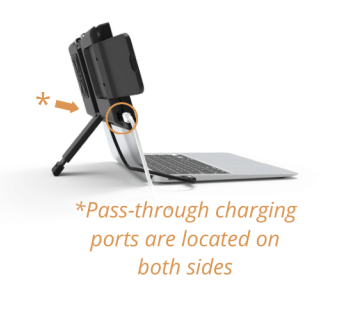
Note: Ensure that your laptop charger provides sufficient wattage (60W-100W) for optimal charging. Pass-through charging may not work as expected if you’re using a third-party charger or a power brick that didn’t come with your laptop.
Need to chat with our team about pass-through charging?
Feel free to reach out to us here and our team is happy to help!